Guardrail
The creative MIDI transformer.
(Hover, tap, or tab through the UI to learn more)
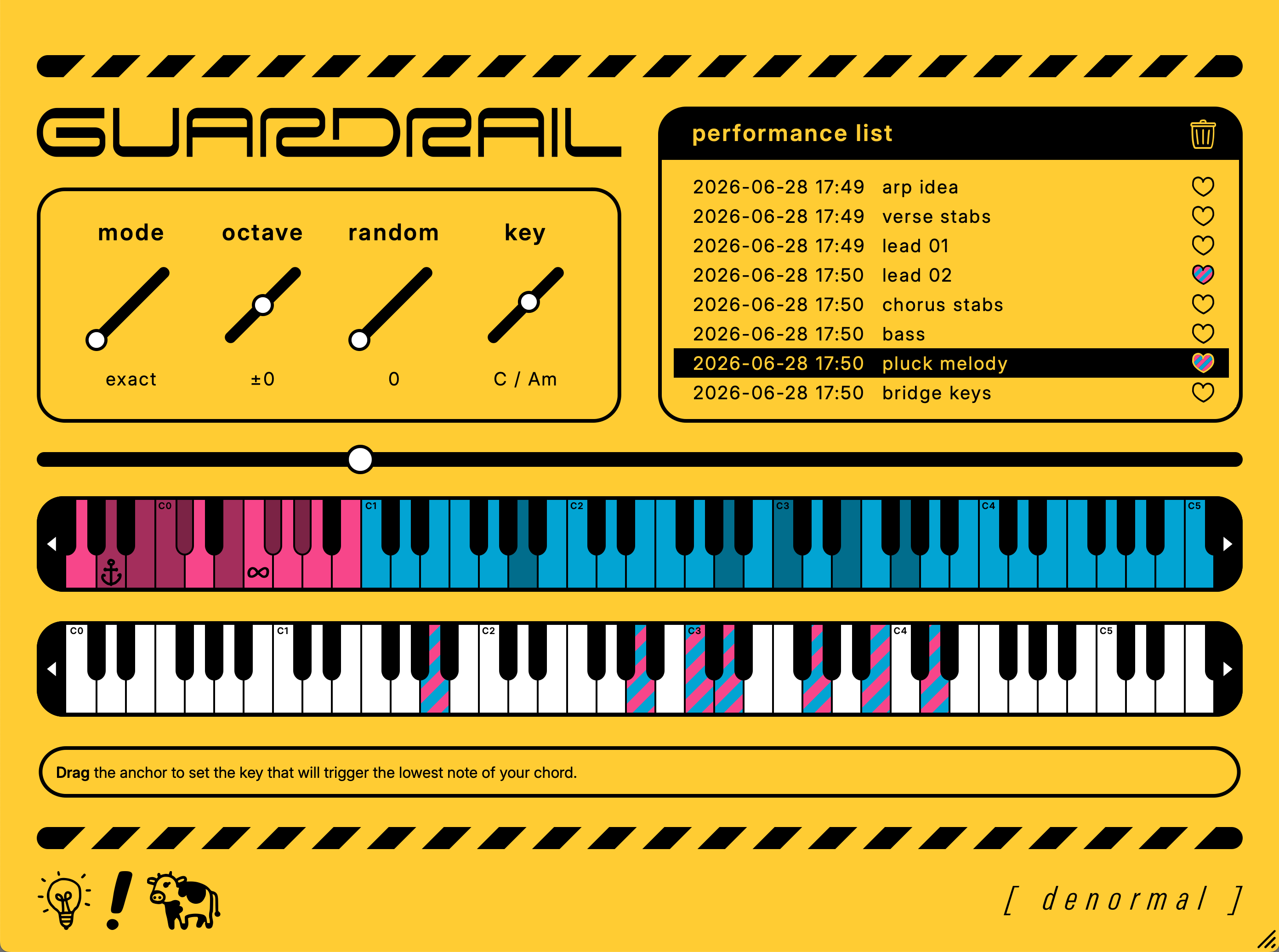
(Guardrail transforms MIDI chords into new ideas—it is NOT a chord generator!)
Interface Guide
- Mode
- Switch between two flavors of chord mapping behavior. "Exact" preserves the ordering and spacing of chord tones. "Compact" reduces the spacing between chord tones and removes octave doubling.
- Octave
- Transpose the octave of the MIDI output.
- Random
- Introduce randomized offsets above key presses in the Performance Zone.
- Key
- Define the scale that non-chord tones will be taken from when black keys are pressed in the Performance Zone.
- Performance List
- Your recorded performances get stored here. Favorite the ones you love and drag them directly back into your DAW for further editing.
- Split Slider
- Adjust the split point between the Performance Zone and the Chord Zone to customize your playing range.
- Performance Zone
- The range on your MIDI keyboard used to trigger notes during performance. White keys trigger chord tones. Black keys trigger passing tones within the scale set by the key slider.
- Chord Zone
- This area displays the incoming MIDI chord progression from your track. You use the performance zone to trigger individual notes from these chords.
- Output Keyboard
- A visual representation of the notes being transformed by Guardrail in real-time.
- Denorma The Cow
- Customizes the colors of the UI to suit your mood.
How It Works
Place Guardrail as the first plugin (or in the MIDI effect slot) on your chord track. When you press play, hitting any white key in the performance zone produces new chords, ideas, and melodies based on your track's chord notes. Black keys add passing tones and extensions depending on the key.
Iterate Quickly
Record-arm your chord track and press play: Guardrail handles the recording. Every time you stop playback, your latest performance is added to the performance list. Favorite your best ideas as they happen.
Intuitive Workflow
No clunky, DAW-inside-a-DAW editing windows. Record your ideas in Guardrail, then drag them back into your DAW to add them to your arrangement and make edits.
Additional Performance Tools
Strum chords using the pitch wheel and manually arpeggiate individual chord notes using the mod wheel for unexpected results.
Make It Yours
Easily configure Guardrail's layout to work with your MIDI keyboard setup and customize its colors to suit your mood.
Refreshingly Free Of Generative AI Sludge
We think the fun part of making music is experimenting until it sounds like you, not prompt-writing. Guardrail helps you workshop your ideas even if keyboard isn't your native instrument.
Media
Use Cases
- Adding a human touch to your progressions
- Rhythmic experimentation of an existing progression
- Reharmonization: Easily perform new voicings of your existing chords for different instruments in your arrangement
- Live performance
- Mobile composition: Even when you don't have access to a full keyboard, Guardrail inherently condenses your MIDI to a compact performance range
- On-the-fly arpeggiation
- Creative MIDI data exploitation / manipulation
Requirements
- macOS 11+ | Windows 10+
- MIDI controller
- Human brain
Supported Formats
- VST3
- AU
- AAX